
Certificate Sample Instructions
- Name of Academic Center
- Name of Program – Addition of this information is optional.
- Name of student – Student’s first and last name must match PeopleSoft name.
Certificate identification and PeopleSoft plans – Certificate identification wording is:
- For PeopleSoft degree codes CERT‐1, CERT 2, CERT‐3, and CERT‐4 wording is “Certificate in”
- For PeopleSoft degree code ADVCT the wording is “Certificate of Advanced Study in”
- For PeopleSoft degree code ADVCTM the wording is “Master’s Level Certificate in”
- For PeopleSoft degree code ADVCTD the wording is “Doctoral Level Certificate in”
The official name of the PeopleSoft plan may be found in the PeopleSoft Plan table. The table limits the description to 30 characters, however, the program name on the certificate does not need to be abbreviated.
- Date of Degree‐ Data may be expressed as month and year or month day and year. A comma should be inserted after the day if the month day year option is selected.
- Locations of signature and title of certifying official(s) – The small black circles correspond to the placement of the signatures for one ‐, two ‐, three ‐, or four signature certificates.
Sample Certificate Layout
The circled numbers shown in this sample correspond to the numbers shown in the instructions above.
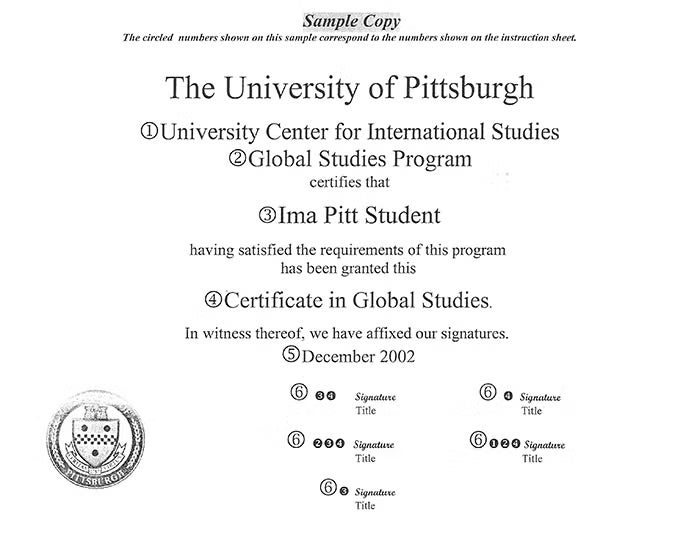
Under text "The University of Pittsburgh," enter item 1, Name of Academic Center, and immediately below that item 2, Name of Program (optional).
Under text that reads "certifies that" enter item 3, Name of Student.
Under text that reads "having satisfied the requirements of this program has been granted this," add item 4, name of certificate.
Under text that reads "In witness thereof, we have affixed our signatures," enter item 5, Date of Degree.
The final area accommodates item 6, Signature and Title of certifying official(s).