
Referrals should be used for non-emergency situations only. For more information about all referrals, see the Referrals page.
Additional details about instructor academic referrals can be found at Academic Referrals in Pathways.
Submitting an Academic Referral in Pathways
Log in to Pathways using your Pitt credentials.
From your Professor Home, you should see the courses you are teaching in the current term and the students enrolled in those courses. Note: You can toggle from your Staff Home (which is used for setting availability for Faculty Advisors or Faculty Office Hours to your Professor Home by clicking the gray triangle.
Under Students in My Courses, select the checkbox beside the student you would like to issue an Academic Referral for, and then choose Issue Referral from the drop-down menu.
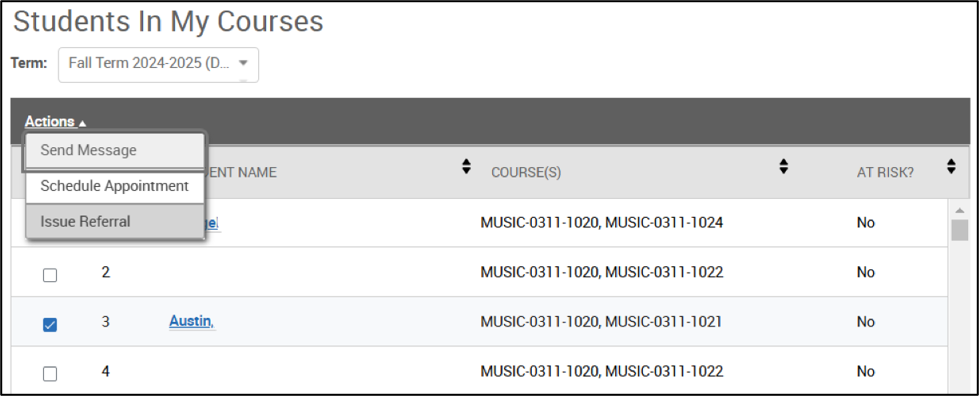
In the Referrals Window that pops up, use the drop-down menu to select your campus academic referral reason.
Academic Referral Reasons include:
- Academic Referral (Pittsburgh Campus)
- Graduate Student Academic Referral
- Bradford Campus Academic Referral
- Greensburg Campus Student Referral
- Johnstown Campus Academic Referral
- Titusville Campus Academic Referral
Next, select the class you teach from the drop-down menu, and add appropriate comments that will be helpful for the office receiving the referral. When you are finished, click the blue Submit button.
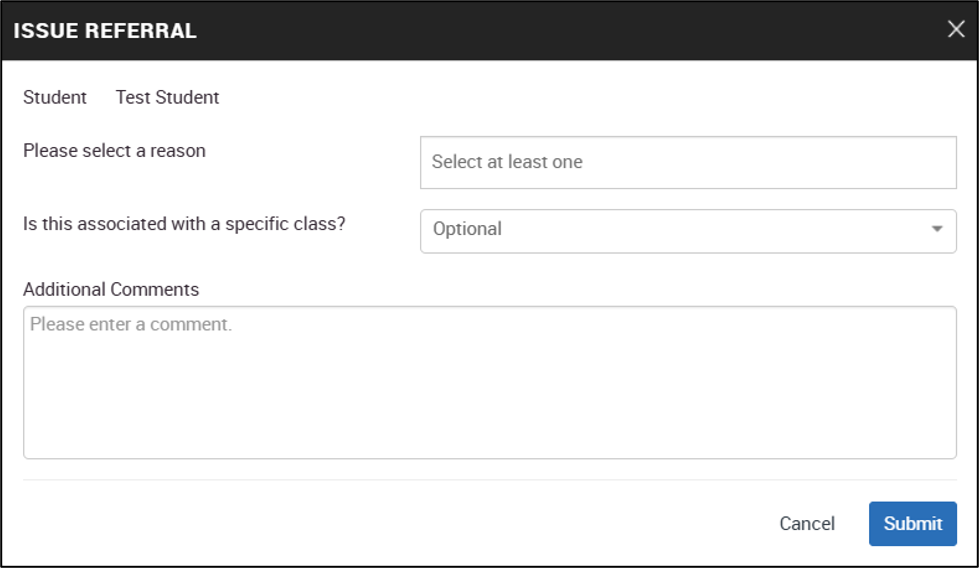
Tip: You can issue the same referral for multiple students by selecting several students at a time, and then using the actions button to Issue Referral.
This will create individual referrals and cases that will contain the same comment. If you need to write a different comment for each student, you will need to issue referrals individually.